How to Choose a Racing Simulator for Your Home Setup
A racing simulator should be chosen around the experience you want to create, not around the most impressive specification sheet. Will you practise circuit racing, explore rally driving, host competitive sessions, or create a refined entertainment space? To clarify the main equipment categories before you buy, consult our racing simulator buying guide.
The market continues to expand, but its published size varies according to how researchers define hardware, software, commercial installations, and home systems. One 2026 market estimate values the global racing simulator market at $1.30 billion in 2026, with further growth projected through 2034. For buyers, this variety means more choice, but also more responsibility to match every component correctly.
What should your racing simulator actually do?
The first decision is not whether you need direct drive, virtual reality, or a motion platform. It is identifying the role your simulator will play. A casual setup for occasional evening sessions has different requirements from a dedicated system used for competition, driver development, or high-end entertainment.
Begin by writing down your primary use case and your preferred driving disciplines. Circuit racing usually benefits from a stable GT or formula seating position, precise braking, and a wide visual field. Rally driving places greater value on rapid steering inputs, a durable mounting solution, and potentially a handbrake. A mixed library requires more adjustability than a single-discipline setup.
Your intended frequency of use matters as well. If you expect to drive for several hours each week, comfort and reliability deserve more of your budget. If the simulator will be used by several people, prioritize seat adjustment, accessible controls, and a cockpit that accommodates different heights.
- Casual use: begin with a wheel, pedals, and a secure desk or compact stand.
- Regular practice: add a dedicated seat, stronger mounting, and a more precise pedal system.
- Competitive use: prioritize rigidity, repeatable braking, display alignment, and upgradeability.
- Driver training: evaluate telemetry, software support, motion fidelity, and professional installation requirements.
How much should you budget for the complete system?
Consider the total system cost rather than the price of the wheel alone. A realistic budget includes the platform, simulation software, wheelbase, steering wheel, pedals, cockpit, seat, display, computer or console, mounting hardware, cabling, and possible shipping or installation.
Published market estimates illustrate why pricing can be difficult to compare. A separate 2026 industry estimate places the global racing simulator market at $754.71 million in 2026, using a different market definition from other research firms. This difference does not determine what you should spend, but it confirms that the category includes very different types of systems.
A practical budget should also include an upgrade reserve. Spending your entire budget on a powerful wheelbase can leave you with a flexible cockpit and unstable pedals. In many cases, a balanced system produces a more convincing experience than one premium component surrounded by weak supporting hardware.
Use this order when allocating funds:
- Core controls: wheelbase, steering wheel, and pedals.
- Structural support: cockpit, seat, wheel mount, and pedal mount.
- Visual system: monitor, television, triple displays, or virtual reality headset.
- Expansion: shifter, handbrake, button box, haptics, audio, and motion.
Leave room for accessories that improve usability rather than appearance. A sturdy monitor mount, cable management, adjustable seat rails, or a more consistent brake elastomer can improve every session. Decorative upgrades can follow once the core driving position feels correct.
Which platform and software should you choose?
Your platform determines which software and hardware can work together. A PC generally provides the broadest access to simulation titles, modifications, telemetry tools, displays, and peripherals. Consoles can provide a simpler setup, but compatibility should be verified before purchasing any wheelbase or pedal system.
Start by listing the software you genuinely want to use. Consider the cars, tracks, driving disciplines, online features, graphical requirements, and community support. A simulator designed for structured online competition may require different hardware and subscription costs from a title focused on single-player racing or open-ended customization.
Compatibility should be checked at three levels:
- Platform compatibility: confirm whether the wheelbase works with PC, PlayStation, Xbox, or multiple platforms.
- Game compatibility: verify that the software supports your chosen wheel, pedals, shifter, and motion equipment.
- Connection compatibility: check whether pedals connect directly to the platform, wheelbase, or a separate USB controller.
It is also useful to decide whether you value simplicity or flexibility. A single ecosystem may reduce configuration work, while a mixed setup can offer more choice. Either approach can work, provided you confirm drivers, mounting patterns, firmware, and console licensing before placing an order.
What type of wheel and pedals provide the right feedback?
The wheelbase is the primary communication channel between the simulator and your hands. Gear-driven systems can be accessible and functional, belt-driven systems generally offer smoother resistance, and direct-drive systems connect the wheel directly to the motor for immediate force feedback.
Higher force does not automatically mean better feedback. What matters is the clarity of the signal, the smoothness of the motor, the available adjustment range, and whether your cockpit can support the torque without flexing. A powerful wheel mounted to an unstable desk can feel less precise than a moderate wheel mounted to a rigid frame.
Pedals deserve equal attention. Basic pedal sets commonly measure travel, while load-cell brakes measure pressure. Pressure-based braking can make it easier to reproduce the same braking force repeatedly, especially during long sessions. It also places greater demands on the pedal deck, seat position, and cockpit stability.
When comparing wheel and pedal systems, examine:
- Force feedback smoothness and detail.
- Wheel rotation range and adjustment options.
- Pedal spacing, angle, and resistance.
- Brake sensing technology and calibration controls.
- Firmware support and replacement parts.
- Mounting requirements and maximum supported torque.
For a design-led installation, our best home racing simulators selection can help you consider how controls, seating, and presentation work together. The important principle remains simple: buy the controls that suit your driving goals, then build a stable environment that allows them to perform consistently.

How should you evaluate the cockpit, seat, and ergonomics?
Imagine driving for two uninterrupted hours. If your shoulders are tense, your knees are too high, or your pedals move under braking, the simulator is not correctly configured, regardless of its price.
The cockpit is the structural foundation of the system. It must hold the wheel, pedals, and seat in fixed positions while resisting movement under force feedback and braking pressure. Lightweight foldable systems can be useful when storage is essential. Tubular frames can provide a clean appearance and a compact footprint. Aluminium profile systems generally offer the greatest adjustability and expansion potential.
Measure the available space before ordering. Record the usable floor area, ceiling height, screen position, door clearance, and storage path. Remember that the screen stand, rear seat frame, pedal extension, and cable routing may require more room than the cockpit frame itself.
Ergonomics should be adjusted around your body, not around a product photograph. Your shoulders should remain relaxed, your wrists should stay close to a natural steering position, and your knees should retain a comfortable bend. The brake pedal should allow firm pressure without forcing your hips or lower back away from the seat.
Look for these adjustment points:
- Seat distance and recline angle.
- Wheel height, depth, and tilt.
- Pedal distance, angle, and lateral spacing.
- Shifter and handbrake position.
- Monitor height and horizontal alignment.
- Mounting points for future accessories.
Upgradeability also protects your investment. If you may later add a stronger wheelbase, load-cell pedals, a handbrake, or motion hardware, confirm that the cockpit supports those additions. A visually compact frame can be attractive, but a modular foundation may be more economical over several years.
Which display setup creates the right sense of speed?
Display choice affects immersion, awareness, and the amount of space your simulator requires. A single monitor is simple and efficient. An ultrawide display can create a broad field of view without the alignment work of multiple screens. Triple monitors provide strong peripheral awareness, while virtual reality can place you directly inside the car.
Choose the display after deciding where the cockpit will remain. A screen that is too far away can reduce visual scale and make the car feel distant. A screen that is too close may require excessive head movement or create discomfort. The correct field of view depends on screen size, viewing distance, aspect ratio, and software settings.
Triple-monitor systems require careful attention to bezel alignment, graphics performance, mounting width, and cable routing. Virtual reality reduces the need for physical screens, but it introduces other considerations, including headset comfort, computer performance, lens clarity, and individual tolerance for motion discomfort.
Do not treat display technology as a substitute for correct ergonomics. A modest screen placed at the right distance can feel more convincing than an expensive display positioned poorly. Visual consistency, stable frame rates, and accurate field-of-view settings are usually more valuable than headline resolution alone.
Is a motion simulator necessary for your goals?
Motion is optional for most home users, but it can be valuable when its purpose is clearly defined. Some systems move the seat, some move the cockpit, and others add vibration or pressure cues. These approaches do not deliver the same type of information.
For entertainment, motion can increase physical engagement and make acceleration, kerbs, and surface changes more noticeable. For training, the important question is whether the movement is coherent with the visual information, steering input, and vehicle dynamics.
A 2024 study on AI-enabled sim racing performance used telemetry data to analyse driver behaviour and predict performance. This illustrates the broader training value of simulation, where repeatable inputs and recorded data can support structured improvement. It does not mean that every motion system creates transferable driver training.
Before adding motion, ask:
- Does the system support the software you intend to use?
- Does the entire cockpit move, or only the seat?
- Are the visual and physical cues properly aligned?
- Can motion profiles be adjusted for different vehicle types?
- Will the floor, room, and neighbours tolerate the movement and noise?
- Does the installation require specialist calibration?
If your purpose is driver development, prioritize accurate software, consistent controls, high-quality telemetry, and a stable visual reference before purchasing motion. If your purpose is immersive entertainment, a simpler motion or haptic system may provide the desired effect without the complexity of a professional training installation.
What is the most sensible way to buy your simulator?
A phased approach reduces compatibility risks and gives you time to learn what you actually enjoy. Start with the platform, software, wheel, pedals, and a secure mounting solution. Use that configuration long enough to identify the limitations you genuinely feel.
Your first upgrade should usually address the weakest part of the experience. If the pedals slide, improve the pedal mount. If the wheel moves, improve the cockpit. If your braking is inconsistent, assess the pedal technology and seating position. If you cannot see the apex clearly, correct the display distance and field of view.
Our luxury racing simulator for sale page is relevant when the objective extends beyond individual components toward a complete, presentation-focused installation. A turnkey system can simplify design decisions, but you should still confirm its platform support, room requirements, software compatibility, installation scope, and future upgrade options.
Before purchase, use this final checklist:
- Define your primary driving use case.
- Set a complete system budget, including installation and accessories.
- Confirm platform, software, and peripheral compatibility.
- Choose pedals and wheel feedback that match your goals.
- Measure the room and plan screen placement.
- Confirm cockpit rigidity, comfort, and upgradeability.
- Decide whether motion adds meaningful value for your intended use.
- Buy from a source that provides clear support, warranty, and documentation.
Choose the simulator around your real driving habits
The right racing simulator is not defined by the highest torque figure, the largest display, or the most elaborate motion system. It is the system that keeps your controls stable, your body comfortable, your software accessible, and your upgrade path realistic. Begin with purpose, budget, platform, and space, then select hardware that supports those decisions. A carefully balanced setup will usually provide more lasting value than an impressive collection of mismatched components. The clearest approach to choosing a racing simulator is therefore to build from the driving experience outward, not from isolated specifications inward.
Take action with TheArsenale
Once you have defined your driving goals, space, and preferred level of immersion, the next step is finding a system that fits your environment and your expectations. A considered installation can combine precise controls, a refined cockpit, and a visual presence that belongs in a private collection or contemporary interior.

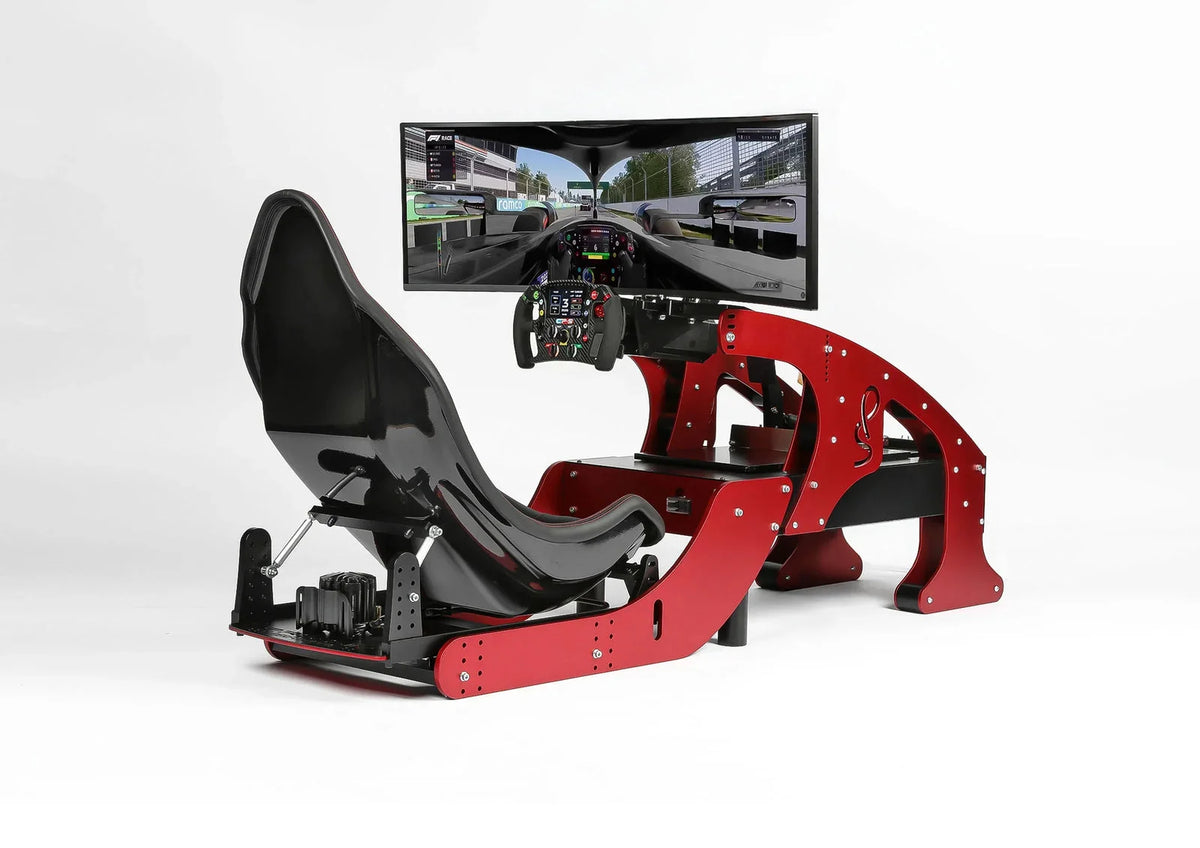
For a complete, design-led solution, explore our Formula Pro racing simulator. It offers a focused starting point for readers who want to move beyond individual components and consider a more cohesive simulator experience through TheArsenale’s curated mobility world.
Frequently Asked Questions
What is the first step when choosing a racing simulator?
Define how you will use it, which software you want to play, and where it will be installed. These decisions determine the appropriate platform, controls, cockpit, display, and upgrade path.
Can you start with a wheel mounted to a desk?
Yes, a desk can be a practical starting point when the wheel and pedals are securely mounted. However, a dedicated cockpit becomes more valuable when you use stronger force feedback, pressure-based braking, or longer sessions.
Is direct drive necessary for a realistic experience?
No, direct drive is not essential for beginning sim racing. It provides detailed and immediate feedback, but a stable cockpit, consistent pedals, and correct software settings often matter more than maximum motor strength.
Should you choose one monitor, triple monitors, or virtual reality?
Choose according to your available space, computer performance, comfort, and preferred field of view. A single display is simpler, triple monitors improve peripheral awareness, and virtual reality can deliver strong immersion without a large physical screen array.
Can TheArsenale help with a high-end racing simulator?
Yes, TheArsenale presents curated mobility and simulator products for readers seeking a more distinctive installation. The Formula Pro racing simulator is a suitable starting point for discussing a cohesive, design-focused solution.